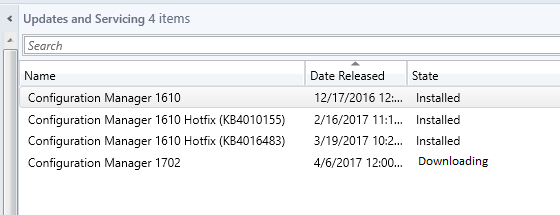
For unknown reason(s) when attempting to update Configuration Manager from 1610 to 1702, our downloading State was stuck. We were able to update from previous versions no problem, but 1702 would not kick over from “Downloading” to “Available”.
Searching through technet and multiple blogs the common resolution is to simply restart the “smsexecutive” service, repeatedly in some instances. This did not work for my environment. After hours of traces with my proxy team, it was determined nothing is being blocked. I proceeded to redeploying the “Service Connection Point” and still no dice.
-Resolution-
In my environment the resolution was removing the option “Use credentials to connect to the proxy server” in the Site system Properties. This option has been utilized since SCCM 2012 RTM in our environment, but due to an unknown change on our proxy or servicing this option had to be deselected for downloading to kick over to Available. Still digging for the root cause…

Error’s in dmpdownloader.log-
File SMSSETUP\BIN\X64\FailoverMgr.dll is being extracted
WARNING: Unable to open registry key ‘SOFTWARE\Microsoft\SMS\SMS_DMP_CONNECTOR\’.
ERROR: Failed to decrypt password: Decryption failed with 0
Now after we cleared up the frozen “downloading” state, we were stuck on “Checking Prerequisites”. I discovered the “\\YourServiceConnectionPointServer\SMS\EasySetupPayload” folder was not shared out in this environment. Once this folder was shared out and all SCCM Machine accounts had full control, “Checking Prerequisites” kicked over. There were no indication of write error’s and not sure why this folder was not shared out in this environment. Restarted the SMS_EXECUTIVE service on both Service Connection point and Primary Site and “Checking Prerequisites” kicked over.
-Popich LLP
 SC Joe
Hello,
I had the same issue updating 1610 to 1702, the installation was tuck in pre-req check or installation, a new program named CMUpdateReset.exe has been released in the new CB 1706 and it is applicable from CB1606, so you can use this new program to solve the update issues (downolading, pre-checking or installation) http://blog.coretech.dk/kea/configuration-manager-current-branch-upgrade-stuck-in-downloading/#comment-647162
I tried to find this new program through internet but no way, so I created a Virtual Machine with fresh installation of SCCM and I was able to install 1706 on it only for retrieving CMUpdateReset.exe, after that I copied CMUpdateReset.exe in the production SCCM and run it with -FDELETE parameter and finally the program cleaned up my SCCM and successfully download and done the update.
I shared for you the program so you can solve your issue. enjoy!
https://www.dropbox.com/s/e9ccyz3d2z3eli5/CMUpdateReset.exe?dl=0
Yazid Mahour